Issue:
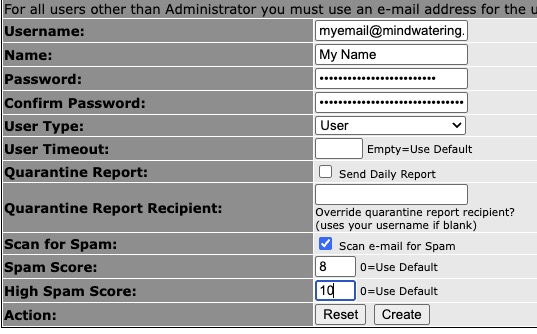
The Spam Score and High Spam Score in MailWatch do not function. Spam is still triggered for the system-wide settings.
In addition, the Scan e-mail for Spam setting also does not bypass the spam check.
Cause:
eFa ships with this feature disabled. If it shipped enabled, People/users w/o an account set-up would not have email checked.
Steps to Enable:
1. Prerequisite:
Ensure that accounts exist for all persons receiving mail. This can be a challenge if the eFa appliance hosts multiple domains that do not share an authentication method. In this case, use the import capability (script) on the eFa website to import the user accounts.
If adding individiually:
web browser --> mailfilter.mindwatering.net --> login as the system admin --> TOOLS AND LINKS (menu item) --> Under Tools (heading) --> User Management --> click New User.
2. Enable:
a. Remote into the appliance:
$ ssh myadminid@mailfilter.mindwatering.net
<enter pwd if not using keys>
$ sudo su -
<enter pwd>
b. Run the configuration settings program and make the change:
$ eFa-Configure
In the menu:
- Choose 6) MailWatch Settings --> 4) Per User Scoring --> review the caution message, Would you like to ENABLE per user scoring? y/N/c
[eFa] Enable/Disable per user spam scoring
[eFa] By default this feature is off.
[eFa] Per user spam scores allow you to specify differing scores based
[eFa] on user in the MailWatch GUI.
[eFa] Caution: users that do not have an account in MailWatch will not
[eFa] be scanned! This is a current limitation in MailWatch per user
[eFa] handling of spam scores.
[eFa] Per user scoring is DISABLED
[eFa] Would you like to ENABLE per user scoring? [y/N/c]:
- Click y
- After changing, choose e) to Return to the main menu -->
- Select how to leave the menu, choose either:
0) Logout from SSH or
1) Shell
2) Reboot system
We chose #2, Reboot.
previous page
|